
Account Hardening Checklist Expanded: Lock Down Your Accounts in One Hour
A step-by-step checklist to lock down email, banking, and social accounts fast. Start with the quick wins, then finish the deeper protections.
FLORIDA FRAUD DEFENSE INITIATIVEFFDIFRAUD PREVENTIONSCAM AWARENESSMFASCAM PREVENTIONONLINE SAFETYFAMILY SCAM SAFETYMULTI-FACTOR AUTHENTICATIONHOME SECURITYTWO-FACTOR AUTHENICATION
Friendly Tech Guide
3/13/20262 min read
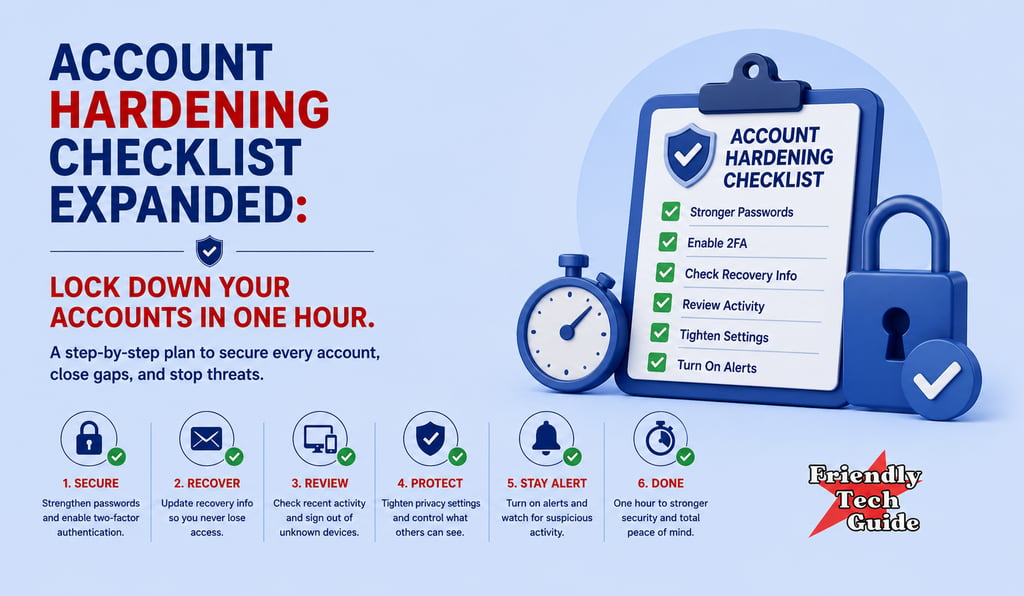
Most people think scams end when you hang up. The truth is, the risk often starts after the first click.
Account hardening means closing the doors that scammers try next. You do not need to be technical. You just need a plan and a checklist.
Quick start first ten minutes
Do these before anything else
1 Change your email password
Use a long passphrase you have never used before.
2 Turn on two-factor authentication for your email
Use an authenticator app if possible.
3 Check your email forwarding rules
Scammers love hidden forwarding so they can watch you.
4 Update your recovery phone and recovery email
Make sure they are yours, not something you do not recognize.
If you do nothing else, do this
Protect your email first. If a scammer controls your email, they can reset everything else.
Email hardening checklist
Password
Use a unique passphrase.
Never reuse passwords.
Two-factor authentication
Turn it on.
Prefer an authenticator app.
Recovery settings
Confirm recovery phone.
Confirm recovery email.
Forwarding and filters
Remove any forwarding you did not create.
Remove any filter that hides bank or password emails.
Recent activity
Review recent sign-ins.
Sign out of devices you do not recognize.
Banking and credit hardening checklist
Bank login
Change password.
Turn on two-factor authentication.
Alerts
Turn on transaction alerts for every card and account.
Card controls
Enable lock card or freeze card if your bank offers it.
Credit freeze
Freeze your credit with the three major bureaus if you believe your identity data is exposed.
Statements
Review the last thirty days line by line.
Social media hardening checklist
Password
Change it.
Do not reuse an email password.
Two-factor authentication
Turn it on.
Connected apps
Remove apps you do not recognize.
Privacy settings
Limit who can message you.
Limit who can see your email or phone number.
Phone and device hardening checklist
Screen lock
Use a strong passcode.
Software updates
Update your phone and computer.
App permissions
Remove permissions you do not need.
Remote access apps
Delete any remote access app you did not intentionally install.
What to do if you think an account is already compromised
1 Change the password from a trusted device.
2 Turn on two-factor authentication.
3 Sign out of all sessions.
4 Contact the company support team.
5 Watch your financial accounts for new activity.
Helpful link
Report fraud to the FTC
If you want the bigger framework
This fits inside the RPR Method.
Recognize the scam signal.
Pause to break the pressure.
Respond with verification, not panic.
Read next
The Pause Method: Stop a Scam in Ten Seconds
You do not need perfect security. You need stronger doors than the scammer expects.
If you found this information helpful, please forward it to someone who could benefit.
If you want calm help tightening your settings and walking through this checklist, reach out at https://friendlytechguide.com.
Disclaimer: Friendly Tech Guide provides general education and support. We are not a law firm, bank, or government agency. For legal or financial advice, contact a qualified professional. If you believe you are in immediate danger, call local law enforcement.
Sources:
Federal Trade Commission Scams and fraud
FBI Internet Crime Complaint Center
AARP Fraud Watch Network
Personalized technical assistance at your convenience.
© 2025. All rights reserved.